Managing AWS cloud with Python
==============================
** Rohit Gupta **
** Developer @plivo **
** @rohit01 **
.notes: 1 min. Say the topic
---
@rohit01
========
- ** FOSS enthusiast **
- ** Fedora Ambassador **
- ** Founded LUG, KGEC **
- ** Python lover **
- ** Cloud Architect @plivo **
.notes: 2 min. Dont look at slide. Seamless!
---
Agenda
======
- ** Cloud computing **
- ** Boto**
- ** Typical scenario: >>infrastructure **
- ** Problems associated **
- ** Solution **
- ** Boto code examples **
.notes: 1 min. Elaborate topics in full file
---
Cloud Computing
===============
- ** Evolving **
- ** Interesting clip: Youtube **
- - ** Cut from above video: Dropbox / Raw video **
.notes: 5 min. Our knowledge of Cloud computing is very limited. Play the video
.notes: Future comparision
---
Benefits
========
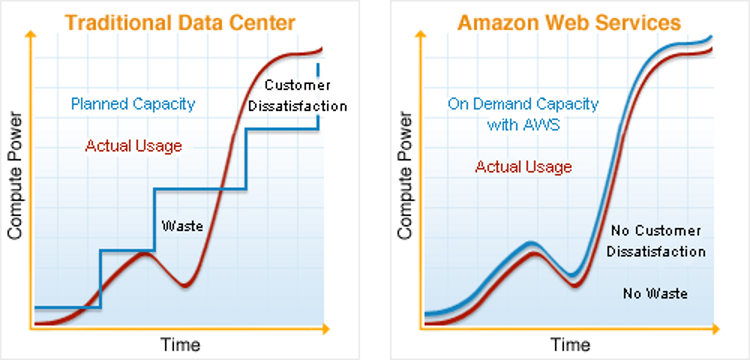
.notes: 3 min. Traditional datacenters require frequent update. With AWS its just a matter of calling the API
---
AWS Terminology
===============
- ** EC2 - Elastic Compute Cloud **
- - ** Seven regions **
- - ** Zones within regions **
- - ** Instance **
- - ** AMI - Amazon Machine Images **
- ** ELB - Elastic Load Balancer **
- ** S3 - Scalable Storage in the Cloud **
- ** Route 53 **
.notes: 5 min. 3 in US, 1 EU, 1 Singapore, 1 SA, 1 Tokyo
---
pip install boto
================
---
Launch instance
===============
!python
from boto.ec2 import connect_to_region
def get_connection(region):
conn = connect_to_region(
region_name=region,
aws_access_key_id='',
aws_secret_access_key=''
)
return conn
def launch_instance(region, ami_image_id):
conn = get_connection(region)
conn.run_instances(ami_image_id)
---
Typical scenario: >>Infrastructure
==================================
- ** 50 servers **
- ** 20 different types **
Manage cloud Resources !
========================
---
ps -ef | grep admin
===================
- ** Maintenance **
- ** 20 image ids (AMI id) **
- ** > 50 backups **
- ** Code updates **
- ** Monitoring **
---
| more
======
- ** Outages **
- ** ELB: load balancers **
- ** Auto-scaling **
- ** Failover **
---
Problem: Resource id's
======================
!python
def launch_instance(region, ami_image_id):
conn = get_connection(region)
reservation = conn.run_instances(ami_image_id)
instance = reservation.instances[0]
print instance.id
- ** instance.id: i-e9ovilp5 **
- ** ami_image_id: ami-80e915e9 **
---
Solution
========
- ** Create Roles for each server type **
- ** Tag Resources **
---
Solution
========
- ** Create Roles for each server type **
- ** Tag Resources **
Simplicity
==========
- ** Find resources **
---
Fetch AMI id
============
!python
def get_ami_id(region, role):
conn = get_connection(region)
my_images = conn.get_all_images(owners='')
for image in my_images:
if image.tags['role'] == role:
return image.id
return None
---
Fetch AMI id
============
!python
def get_ami_id(region, role):
conn = get_connection(region)
my_images = conn.get_all_images(owners='')
for image in my_images:
if image.tags['role'] == role:
return image.id
return None
Launch Instance
===============
!python
def launch_instance(region, role):
conn = get_connection(region)
ami_id = get_ami_id(region, role)
reservation = conn.run_instances(ami_id)
instance = reservation.instances[0]
instance.add_tag('role', role)
print 'Instance launched!'
---
Syntax: Resource Tagging
========================
- ** Get the Resource object from AWS using boto **
- ** Add the tag using the Syntax given below: **
# ** .add_tag('', '') **
---
AWS Outage
==========
- ** Instance **
- ** EBS **
- ** DNS **
- ** ELB **
- ** API calls **
---
1 Minute; Every minute
======================
- ** Offline data store **
- ** Redis **
- ** Auto + manual failovers **
---
Failover
========
- ** Identify **
- ** Launch **
- ** Recover **
---
Chaos Monkey
============
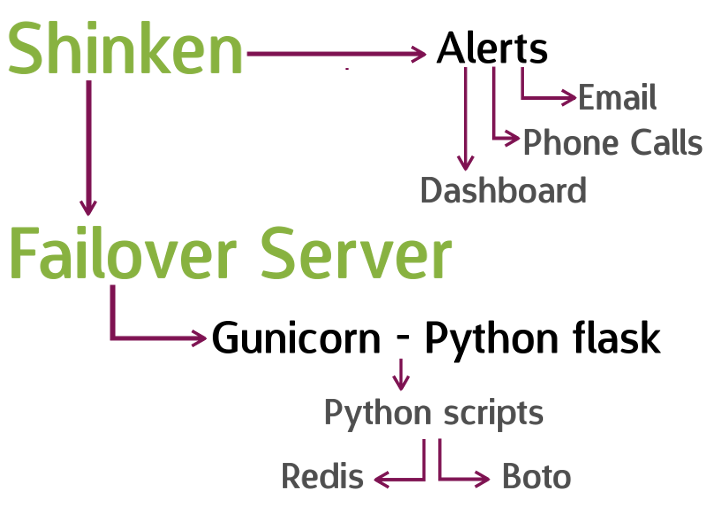
---

---
Thank You
=========
** Rohit Gupta **
** Developer @plivo **
** Email: rohit@plivo.com **
** Ph: +91-8496035658 **
** Slide link: [https://bit.ly/plivoaws](https://bit.ly/plivoaws) **