Build service dashboard using Shinken
=====================================
** Rohit Gupta **
** Developer @plivo **
** @rohit01 **
---
Why are we here?
================
- ** Monitor everything: Shinken **
- ** Shinken Architecture **
- ** NRPE Plugins **
- ** Write your own NRPE plugin **
- ** Automated service checks **
- ** Integrate your plugins **
- ** API based User Interface **
---
What is Shinken?
================
---
Shinken Architecture
====================
---
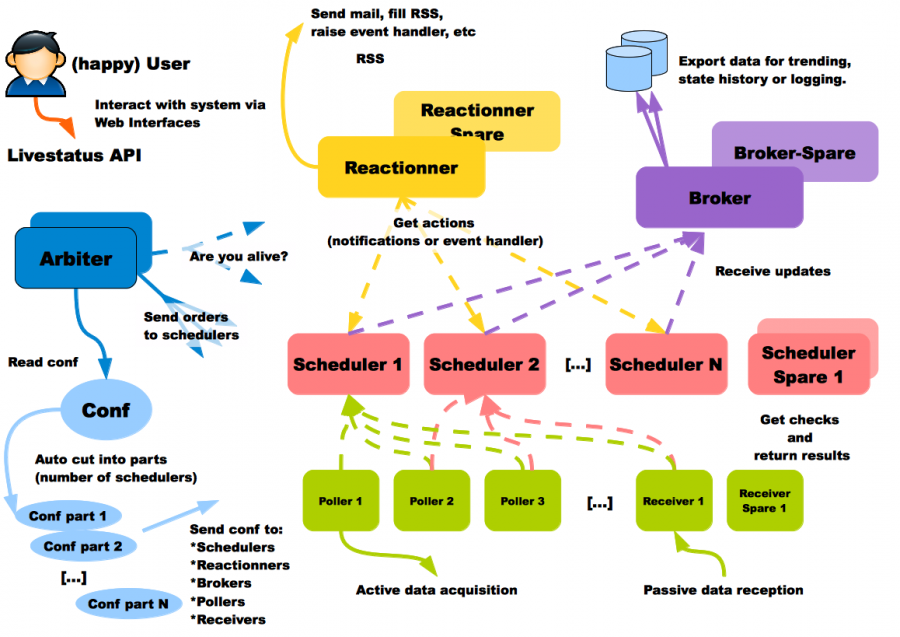 ==================================================================================
---
NRPE Plugins
============
---
Write your own NRPE plugin!
===========================
---
Python NRPE Example
===================
!python
import requests
import sys
import time
ST_OK = 0
ST_WR = 1
ST_CR = 2
ST_CR = 3
url = 'http://plivo.com'
try:
start_time = time.time()
response = requests.get(url, timeout=2)
end_time = time.time()
except Exception:
print 'Critical - Exception occured while fetching url: %s' url
sys.exit(ST_CR)
---
Continue...
===========
!python
latency = end_time - start_time
if response.status_code < 200 or response.status_code >= 300:
print 'Critical - Response code: %s for url: %s' \
% (response.status_code, url)
sys.exit(ST_WR)
elif latency > 1:
print 'Warning - latency: %s secs for url: %s' % (latency, url)
sys.exit(ST_WR)
print 'Ok - %s tested successfully' % url
sys.exit(ST_OK)
---
Things to Consider
==================
- Dont Re-Invent the wheel!
- Exit values
- Setup and Teardown
- Locks
- Exceptions
- Logs
- Be verbose but you have single line
- Graph everything
---
Integrate your plugins
======================
- ** Configuration DIR: ** /usr/local/shinken/etc/
- ** resource.cfg **
$PYTHON_VENV$=/usr/src/python_env
$PLUGINSDIR$=/usr/local/nagios/libexec
- ** commands.cfg **
define command{
    command_name    my_web_check
    command_line    $PYTHON_VENV$/bin/python $PLUGINSDIR$/my_web_check.py
}
- ** contacts.cfg **
---
Continue...
===========
- ** templates.cfg **
# This is how critical call + email alerts are sent, 24x7 way.
define notificationway{
       notificationway_name                 email_and_call_alerts
       service_notification_period          24x7
       host_notification_period             24x7
       service_notification_options         c
       host_notification_options            d
       host_notification_commands           host_email_alerts
       service_notification_commands        service_email_and_call_alerts
}
- ** pip install pyro **
---
Some Good Practices
===================
- Dont write for success scenarios
- Atomic checks
- Avoid mutual dependency
- Stats collection
- Avoid many hops
- Tricky for long running tests
- Be more verbose
---
API based User Interface
========================
---

---
Thank You
=========
** Rohit Gupta **
** @rohit01 **
** Developer @plivo **
** Email: rohit@plivo.com **
** Ph: (+65) 31583923 **
** Slide link: [http://bit.ly/plivosg](http://bit.ly/plivosg) **